















How Modern AI Document Processing Activates Your Trapped Data
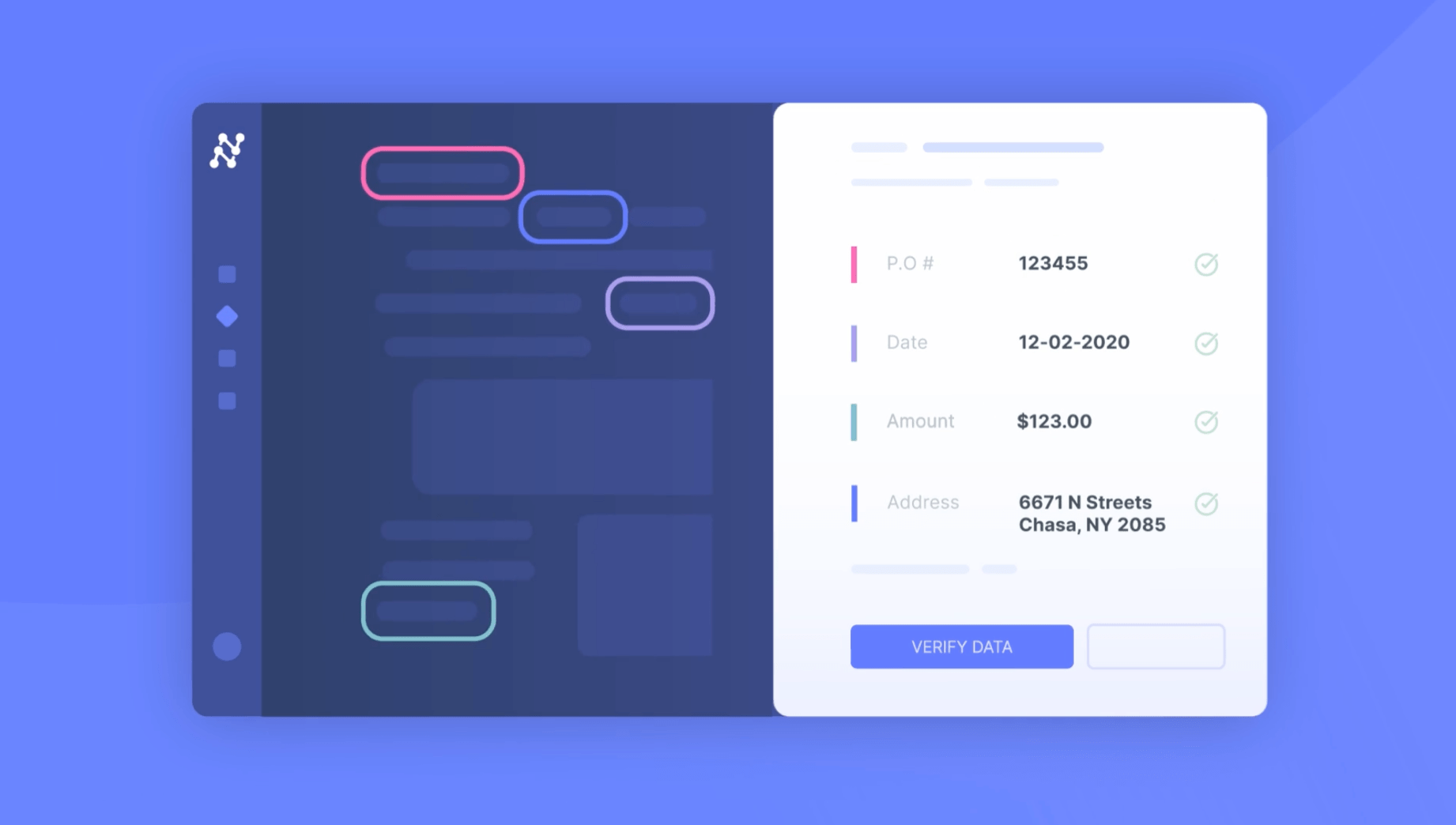

If you're in finance, legal, or operations, you're already well aware that your most critical business intelligence is trapped in a chaotic mess of unstructured data—PDFs, scans, and emails. The real conversation isn't about the problem anymore; it's about finding a document processing solution that actually works without creating more headaches. We've all been burned by rigid, template-based tools and legacy OCR that break the second a vendor changes an invoice layout. Those "good enough" solutions are a constant drag on operational efficiency and accuracy, and they just aren't cutting it.
The good news is that the arrival of Generative AI and powerful LLMs has completely changed the game. We're at a strategic turning point where intelligent document processing (IDP) is no longer just about data extraction. It's about creating a clean, reliable, and structured intelligence layer for your entire company—the kind of high-quality, 'RAG-ready' (Retrieval-Augmented Generation) data that powers the next wave of AI tools and agentic workflows.
So, let's walk through the new landscape of AI document processing options, from building it yourself to buying a platform, and figure out the best strategic path forward.
The modern AI document processing landscape
Alright, so we've established that modern IDP is a strategic must-have. The next logical question is, "Okay, so what are my options?" From what we've seen helping companies navigate this, the market isn't a simple list of vendors. It's more of a spectrum of approaches, each with its own trade-offs.
Finding the right spot on that spectrum really depends on your team's resources, expertise, and what you're ultimately trying to achieve.
a. The DIY approach
For teams with a deep bench of in-house AI and engineering talent, the "do-it-yourself" path can look pretty appealing. This usually means grabbing powerful open-source libraries like Tesseract for OCR (or Nanonets' own open-source model, DocStrange), pulling models from Hugging Face for specific NLP tasks, and using frameworks like LangChain to stitch it all together into a custom pipeline.
- The upside: You get total control. You own the entire stack, there's no vendor lock-in, and the direct software costs can seem lower. It's your system, built your way.
- The reality check: As we've seen in countless developer forums, this path is far from "free." It's a significant investment in highly specialized (and expensive) talent. It means long development cycles, and you're essentially signing up to build, maintain, and secure a complex AI product internally, forever. It's a true "build" decision that can sometimes distract from the actual business problem you were trying to solve in the first place.
b. The hyperscalers
The big cloud providers offer some incredibly powerful, pre-trained models that you can use as building blocks. Services like Google Document AI, AWS Textract, and Azure AI Document Intelligence are genuinely world-class at specific tasks.
- The upside: You get scalable, enterprise-grade infrastructure and amazing power for specific extraction tasks. They're excellent components for a larger system.
- The catch: They are often just that—components. These services are not a complete, out-of-the-box solution. To build a true end-to-end workflow, you still need a significant development effort to handle things like document classification, data enrichment, validation rules, approval queues, and all the final integrations. Plus, their pricing models can be complex and hard to predict at scale, which can make calculating the total cost of ownership a real challenge.
c. The end-to-end AI document processing platforms
This brings us to the complete, integrated platforms like Nanonets and Klippa designed to manage the entire document lifecycle, from the moment a document arrives to the moment the clean data is in your ERP. These solutions are built with the business user—the person in finance or operations—in mind.
- The upside: The biggest win here is a dramatically faster time-to-value. These platforms come with all the necessary workflow tools—like rule-based validation, approval queues, and pre-built ERP integrations—ready to go. They're designed to empower the finance or operations teams themselves to build and manage their own workflows.
- The catch: The main risk is getting locked into a rigid platform that recreates the same template-based problems you were trying to escape. The key is finding a platform that doesn't sacrifice flexibility and customization for ease of use. Some platforms can become slow when processing large or complex documents, while others have a steep learning curve that can be a barrier for non-technical users.
ROI is too high to even quantify!
"Our business grew 5x in last 4 years, to process invoices manually would mean a 5x increase in staff, this was neither cost-effective nor a scalable way to grow. Nanonets helped us avoid such an increase in staff. Our previous process used to take six hours a day to run. With Nanonets, it now takes 10 minutes to run everything. I found Nanonets very easy to integrate, the APIs are very easy to use." ~ David Giovanni, CEO at Ascend Properties.
What a true end-to-end AI-powered document processing workflow looks like
Let's get into the nuts and bolts of what a "complete" solution actually does. It's more than just a single AI model; it's an entire, orchestrated workflow. We see this as a six-stage intelligence pipeline that serves as a great benchmark for evaluating any system. It’s the journey a document takes from being a static file to becoming actionable intelligence that fuels a real business process.
Stage 1: Capture and classify
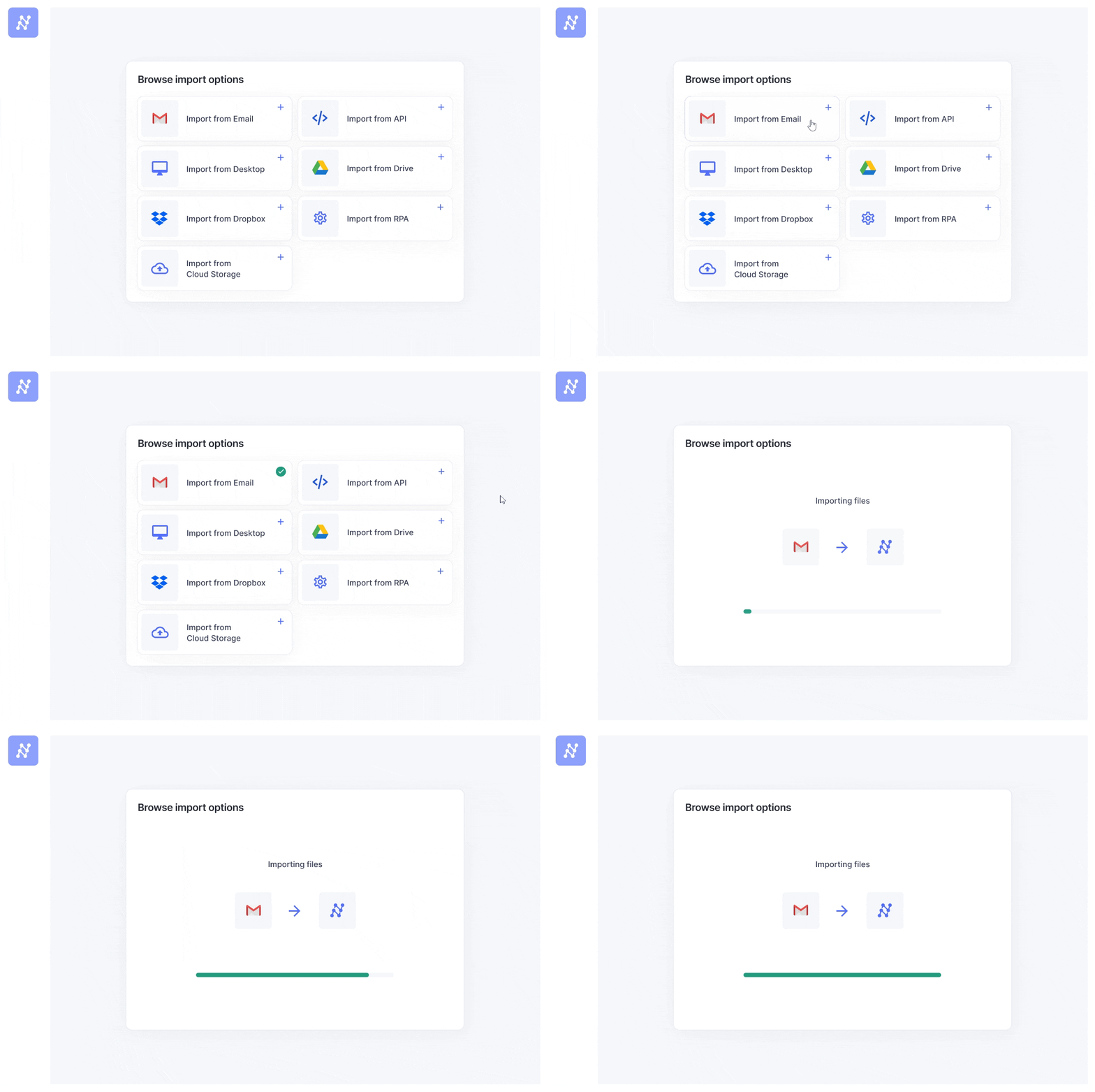
First things first, the documents have to get into the system. In any given company, they arrive from a dozen different channels. A modern IDP platform needs to act as a unified digital mailroom, capable of ingesting files from anywhere, automatically.
- Email Inboxes: Automatically pull attachments from dedicated inboxes (e.g., invoices@company.com).
- Cloud Storage: Sync with folders in Google Drive, Dropbox, OneDrive, or Box.
- APIs: Integrate directly with your existing business applications or customer portals.
- Scanners & SFTP: Handle inputs from physical mailrooms or secure file transfer protocols.
Once a document is in, the system needs to figure out what it is. Is it an invoice? A contract? A bill of lading from an ANZ port? This classification step is crucial for routing the document to the correct processing workflow.
We've seen that the most successful implementations often start by standardizing intake. For example, a company like GenesisONE set up a dedicated Gmail account with auto-forwarding rules. This simple step creates a consistent, automated on-ramp for all vendor invoices, eliminating the manual step of uploading files and ensuring the workflow is triggered instantly.
Stage 2: Extract
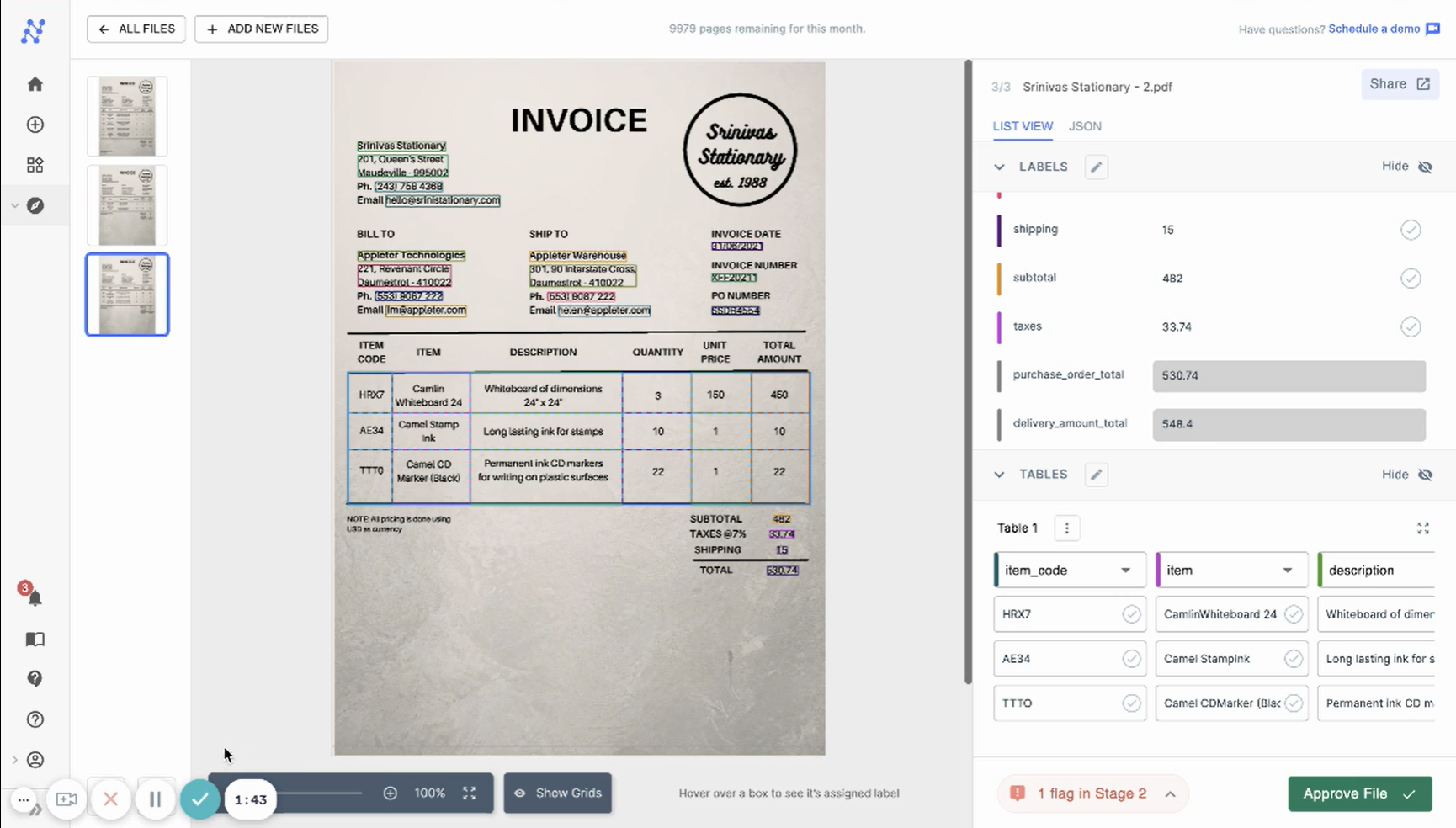
This is the core of the operation: pulling the structured data from the unstructured document. This is where modern AI really shines, especially on the kinds of documents that used to bring older systems to a halt. We're talking about:
- Handwriting: Accurately deciphering handwritten notes on a delivery slip or comments on a field service report.
- Complex tables: Correctly extracting every single line item from a table that spans multiple pages, a notorious failure point for legacy OCR.
- Long documents: Processing a 100-page legal agreement or a dense financial report without losing the plot.
For those long documents, which often exceed an LLM's context window, a technique called intelligent chunking is key. Instead of just blindly splitting a document, the AI identifies semantically related sections. You could use keyphrase extraction to ensure that the full context of a clause or paragraph is preserved, which is critical for accurate understanding.
The true test of a modern IDP system is its ability to handle high variability without templates. For a growing business, new invoice formats from different vendors are a constant. A system that learns on the fly, rather than requiring a new template for each new vendor, is essential for scalable growth without adding administrative overhead.
Stage 3: Enrich and reason
Raw extracted data is useful, but enriched data is where the real value is. This stage is about adding business context, and it's a major differentiator for a modern IDP platform. It's not just about looking up a vendor's ID in your database. It's about multi-document reasoning—the ability to understand the relationships between a set of related documents.
- PO matching: Automatically matching an invoice to its corresponding purchase order.
- Vendor validation: Checking a vendor's VAT number or business registration against your master database.
- Data standardization: Converting dates and currencies to a consistent format, whether they're coming from the US, EU, or Australia.
The ability to synthesize information across multiple documents is a hallmark of an advanced AI system. It moves beyond simple pattern matching to genuine, context-aware reasoning.
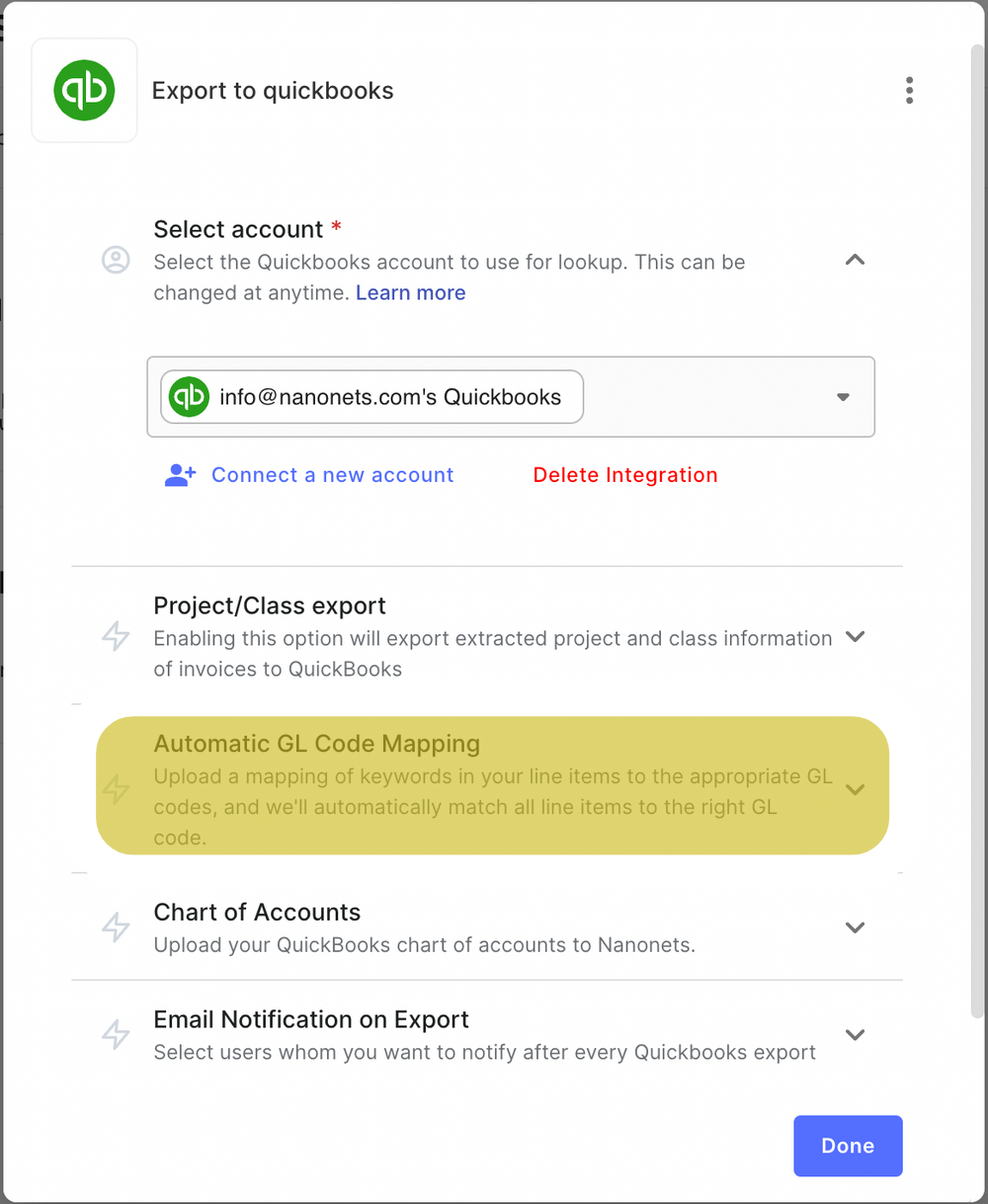
Enrichment is often where the most critical business logic lives. For instance, many accounting systems require a General Ledger (GL) code for each invoice, even though the code isn't on the document itself. An effective IDP workflow can automatically look up the vendor name in a master data file (like a simple CSV) and append the correct GL code, turning a manual research task into an automated step.
Stage 4: Validate
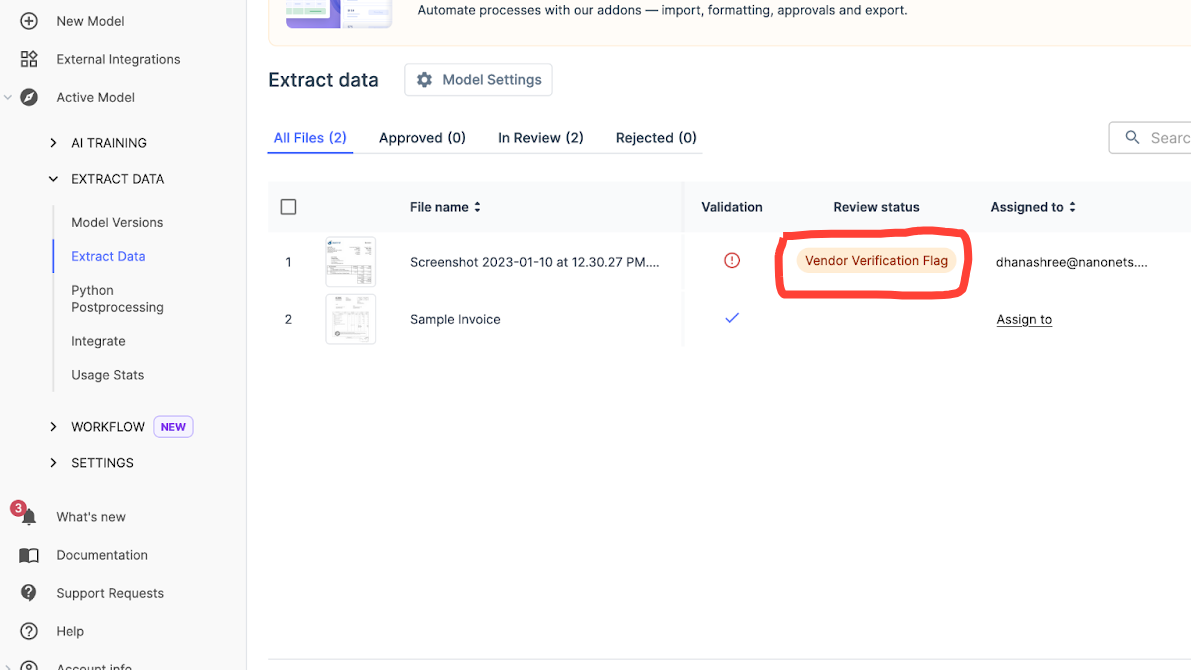
No AI is perfect, and in high-stakes environments like finance and legal, you need 100% confidence. This is where "human-in-the-loop" validation comes in, but we like to think of it more as "Human-AI Teaming." The AI does the heavy lifting, processing thousands of documents and flagging only the exceptions—the ones with missing data, mismatched numbers, or low confidence scores.
Every time your expert team members make a correction, the AI learns. The AI can be trained to build domain expertise through this iterative feedback. It gets better and more specialized with every task, quickly becoming an expert on your company's unique documents. This continuous learning loop is how our clients get to over 90% straight-through, no-touch processing.
A well-designed validation stage allows for sophisticated, multi-step approval workflows. For example, you can set a rule that any invoice over $5,000 is automatically routed to a finance manager for approval, while smaller invoices are approved automatically if they pass all data checks. You can even set up conditional logic to route invoices to specific department heads based on the GL code. This transforms the validation stage from a simple data check into a powerful business process management tool.
Stage 5 & 6: Consume
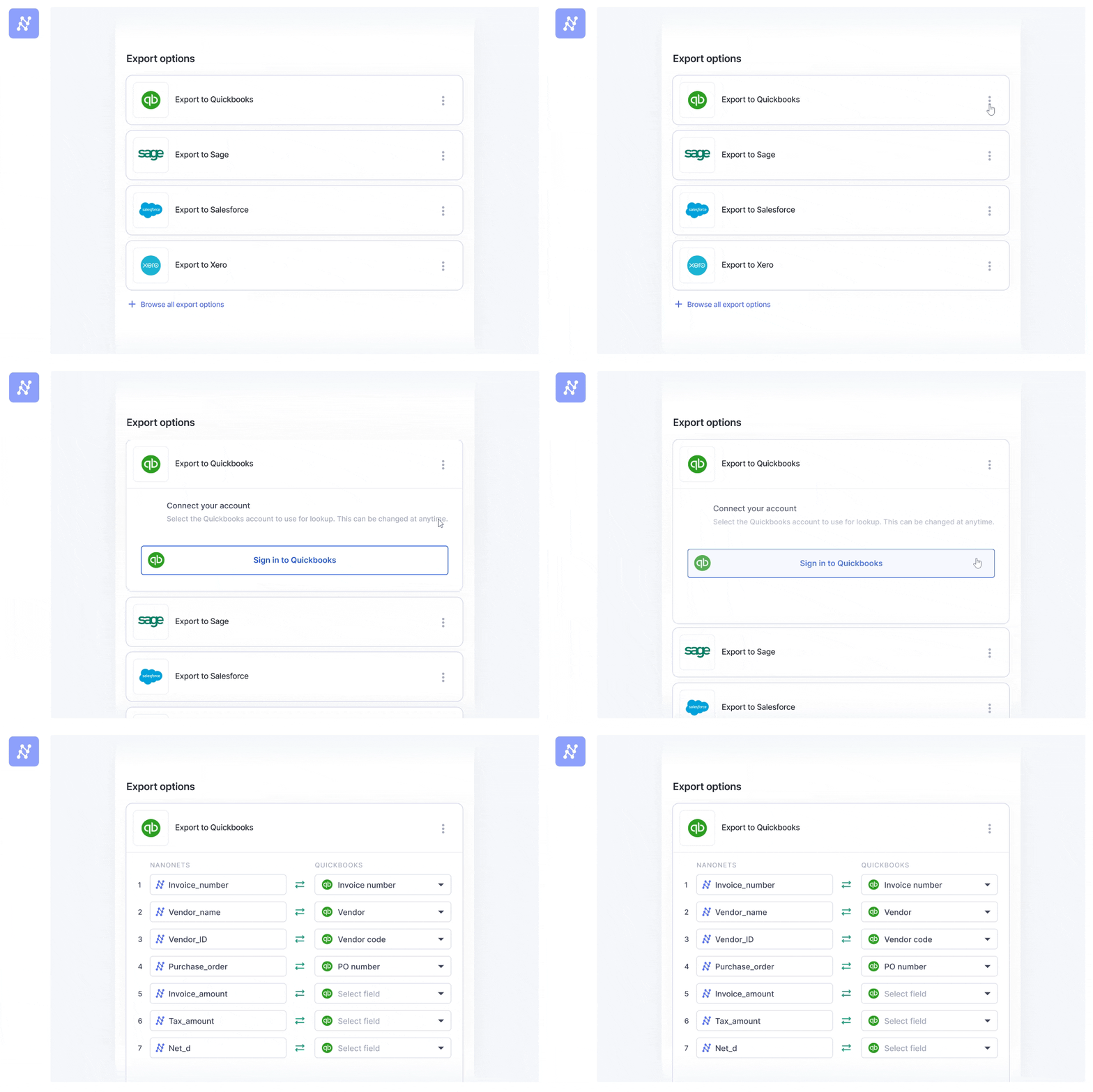
The final stage is to deliver the clean, validated, and enriched data to the systems that run your business. A complete IDP solution doesn't just drop a CSV file on you; it seamlessly integrates with your existing software stack. This is what closes the automation loop and makes the entire process truly hands-free.
- Common integrations:
- ERPs: SAP, NetSuite, Oracle
- Accounting Software: QuickBooks, Xero, Sage
- Databases: SQL Server, MySQL, PostgreSQL
- Cloud Storage and spreadsheets: Google Drive, Box, Google Sheets, Smartsheet
The key here is flexibility. Financial services firms often need to push data directly into specific objects in Salesforce, while other companies might require a custom-formatted CSV to be ingested by specialized accounting software like Foundation. A flexible consumption stage ensures the activated intelligence flows into your existing systems without requiring more manual work, a challenge that ACM Services solved by customizing their CSV output to be perfectly compatible with their accounting software.
AI document processing solutions for workflow challenges
| Challenge | Action |
|---|---|
| Data Inaccuracy | Eliminates errors through precise machine learning-driven extraction. |
| High Volumes of Data | Extracts documents at a large scale, effortlessly scaling with business expansion. |
| Compliance Failure | Automates compliance measures, maintaining strict adherence to regulations. |
| Unstructured Data | Deciphers and accurately extracts data from diverse formats using advanced AI. |
| Existing Systems Integration | Fluidly integrates and syncs data with existing systems, ensuring smooth transitions. |
| Multiple Languages | Breaks language barriers, processing documents in various languages with ease. |
| Limited Visibility | Grants real-time monitoring and control for swift issue identification and resolution. |
How to choose your path forward
In a 2018 survey, it was revealed that treasury teams at US and European brands spend nearly 4,812 hours every year on spreadsheets for managing cash, payments, and accounting tasks. Much of this time may be taken up by manual data entry, verification, and error correction.
The productivity and ROI gains from IDP can be significant. McKinsey reports that document intelligence and automation programs have saved more than 20,000 employee hours in a single year for a leading North American financial services firm. Another study found that optimizing front—and back-office services through automation can reduce fixed costs by 20-30%.
And it's not just one team that benefits. HR, purchasing, and other teams spend hours manually processing documents.
AI document processing ROI calculator
Nanonets PRO plan cost = $999/month
In case the number of pages goes beyond 10,000 in a month, an extra fee of $0.1 will be charged for each additional page.
Notes and assumptions (click to expand)
- This ROI calculation focuses solely on document processing-related costs and does not consider the costs of other tools or processes that may be in use.
- The calculation is simplified and excludes additional expenses such as supplies, storage, and potential processing delays.
- This calculation does not reflect the potential for increased revenue from reallocating employee time to higher-value tasks.
- Calculations are based on Nanonets' PRO plan, compared to the cost of manual processing.
- The total cost after implementing Nanonets includes the Nanonets subscription cost, additional cost per page (if applicable), and the wages of one clerk to manage the system. This assumption may not accurately represent the situation for all businesses, especially larger ones with more complex document processing needs.
- By automating document processing, employees can focus on more meaningful and strategic work, improving job satisfaction and productivity. This benefit is not explicitly quantified in the ROI calculation.
- Consideration of larger ROI benefits from factors not included in this calculation is suggested.
- Nanonets offers a pay-as-you-go model suitable for smaller businesses or lower document volumes, with the first 500 pages free, followed by a charge of $0.3 per page.
This brings us to the big strategic question that we see every organization grapple with: Do you build a custom solution from the ground up, or do you buy a platform?
For years, this was a rigid, binary choice. But in today's fast-moving AI landscape, we think that's an outdated way of looking at it.
Re-evaluating "Build vs. Buy" in the age of AI
The smartest approach we've seen successful companies adopt is a hybrid one, what our friends at BCG call a "Buy-and-Build" strategy. The idea is simple but powerful: instead of making one massive, all-or-nothing decision, you can combine the best of both worlds. This strategy involves buying a powerful, flexible core platform and then building your unique, proprietary workflows on top of it.
This allows you to "buy" the complex, underlying AI infrastructure—the pre-trained models, the secure cloud environment, the core workflow engine—while your team "builds" the specific business logic that creates a real competitive advantage. This could mean crafting custom approval rules, unique data enrichments, or specific integrations into your ERP setup. This approach lets you focus your valuable internal resources on what truly matters: solving your business problem, not reinventing the AI wheel.
A framework for evaluating your options
Whether you're leaning towards a DIY approach, piecing together hyperscaler tools, or choosing an end-to-end platform, here's a practical framework to guide your decision. We encourage every team to think through these five key factors:
- Total Cost of Ownership (TCO): This is the big one. It's easy to get fixated on software license fees, but they're just one piece of the puzzle. For a "build" or hyperscaler approach, you have to factor in the cost of a dedicated team of expensive AI/ML engineers, data labeling, cloud compute, and ongoing maintenance. For "buy" platforms, you need to look for transparent pricing. Complex pricing models can be a major source of frustration. The goal is to find a solution with a predictable TCO that aligns with the value it creates.
- Time to value: In today's market, speed is a competitive advantage. How quickly can you get a solution into production and start solving a real business problem? A custom build can take many months, if not years, to get right. An end-to-end platform should be able to get you up and running on your first use case in a matter of days or weeks.
- Flexibility and customization: This is where many "buy" solutions fall short. Can the platform adapt to your unique documents and workflows without requiring a developer for every minor change? This is a critical point we've obsessed over. A modern IDP solution should empower your business users—the people in finance and operations who actually know the process best—to configure and adapt workflows themselves through a no-code interface.
- The vendor as a partner: When you're implementing a strategic piece of technology, you're not just buying software; you're entering into a relationship. User reviews across the board make it clear: responsive, expert support is a massive differentiator. Does the vendor feel like a true partner invested in your success? Are they willing to help you tackle your unique edge cases and provide guidance along the way?
- Future-proofing: The world of AI is not standing still. Does the platform have a clear roadmap that embraces the future of agentic workflows and self-optimizing pipelines? Choosing a partner who is innovating and staying at the forefront of AI ensures that your investment will continue to pay dividends for years to come.
Transform your business operations like Expartio.
Expartio transformed their passport processing with 95% accuracy using Nanonets AI, saving hours of manual data entry and enabling them to focus more on providing top-notch customer service. Get in touch with our sales team to learn how Nanonets can help automate your specific document processing workflows and achieve tangible results.
The future is agentic and self-optimizing
The world of AI is moving incredibly fast, and document processing is right at the forefront of this change. While the six-stage pipeline we've discussed is the blueprint for today's top-tier solutions, it's also the foundation for what's coming next. Here’s a quick glimpse of where the industry is heading.
As a recent PwC report predicts, AI agents are set to become a core part of the knowledge workforce. In the world of document processing, this means moving beyond simple extraction and validation. The future isn't just an AI that can read an invoice; it's an AI agent that can manage the entire accounts payable process. Imagine an agent that can:
- Receive an invoice via email.
- Cross-reference it with the original purchase order and the contract terms.
- Identify a discrepancy and draft an email to the vendor requesting clarification.
- Once resolved, route the invoice for internal approval.
- After approval, schedule the payment in the ERP system.
This level of end-to-end orchestration, with a human expert managing a team of digital agents, is where the industry is rapidly moving.
The power of multi-document reasoning
The ability for an AI to understand an entire "case file" of related documents holistically is the next frontier. Today, we're already seeing the beginnings of this with systems that can compare a PO to an invoice. Tomorrow, this will be supercharged. Imagine an AI that can review a complete mortgage application package—the application form, pay stubs, tax returns, and bank statements—and provide a comprehensive summary of the applicant's financial health and any potential risks. This is the power of multi-document reasoning, and it will transform knowledge-based work.
From static workflows to self-optimizing pipelines
Perhaps the most advanced concept, emerging from recent research, is the idea of a self-optimizing pipeline. This is an AI that doesn't just execute the workflow you design; it analyzes the workflow's performance and suggests improvements to make it more accurate and efficient over time. Drawing from research on agentic frameworks, these future systems will be able to identify bottlenecks or recurring error types and proactively recommend changes to the workflow, turning a static process into a dynamic, self-improving system.
Wrapping up
The goal of AI document processing is no longer just to automate paperwork; it's to activate the intelligence within it. Modern IDP makes your business faster, smarter, and more data-driven. It frees your most valuable employees from the drudgery of manual data entry and empowers them to focus on the strategic, high-impact work they were hired to do. The technology is here, and it's more accessible than ever.
From hours to seconds: Achieve similar results!
"Tapi has been able to save 70% on invoicing costs, improve customer experience by reducing turnaround time from over 6 hours to just seconds, and free up staff members from tedious work." - Luke Faulkner, Product Manager at Tapi.
Frequently asked questions
What's the difference between OCR and AI Document Processing (IDP)?
OCR converts images to text. IDP is an end-to-end system that uses OCR, AI, and machine learning to understand, validate, and integrate that text into business workflows.
How accurate is AI document processing?
Modern platforms like Nanonets consistently achieve over 95% accuracy, even on complex documents, and the AI continues to learn and improve from user feedback over time.
Can AI process handwritten documents and low-quality scans?
Yes. Thanks to advanced computer vision models, modern IDP can accurately extract data from a wide range of challenging documents, including those with handwriting, low-resolution scans, and varied layouts.
How does Nanonets ensure my data is secure?
We are an enterprise-grade platform with robust security measures. Nanonets is SOC 2 Type II certified and GDPR compliant, with all data encrypted both in transit and at rest.
What kind of integrations does Nanonets support?
Nanonets offers pre-built integrations with hundreds of applications, including major ERPs (SAP, NetSuite), accounting software (QuickBooks, Xero), cloud storage (Google Drive, Dropbox), and more. We also have a powerful API for custom integrations.
How does the pricing for IDP solutions typically work?
Pricing is often based on the number of documents processed or the number of fields extracted. Nanonets offers flexible monthly subscription plans based on your volume, with clear pricing for any overages.
What is the implementation process like?
With a no-code, template-free platform like Nanonets, you can get started in minutes. You can either use our pre-trained models for common documents like invoices or train a custom model in a few hours with as few as 10-20 sample documents.
Can the AI handle documents in multiple languages?
Yes. Modern IDP platforms are designed to be multilingual and can process documents from around the world, supporting both Latin and non-Latin character sets.
What's Your Reaction?
 Like
0
Like
0
 Dislike
0
Dislike
0
 Love
0
Love
0
 Funny
0
Funny
0
 Angry
0
Angry
0
 Sad
0
Sad
0
 Wow
0
Wow
0